
WaitlistPlus helps your organization collect applications, manage who is waiting, and keep families informed. You can maintain separate lists for different programs or groups, track each person’s progress, and follow up when a place becomes available.
The staff app and the customer pages
- Staff app: Sign in to manage people and families, update lists, send emails, and change site settings.
- Public signup form: Share this link with new applicants so they can submit information and join a waitlist.
- Customer portal: Share a family’s private portal link so they can view the information you make available and use any actions you enable. See Set up and share the customer portal.
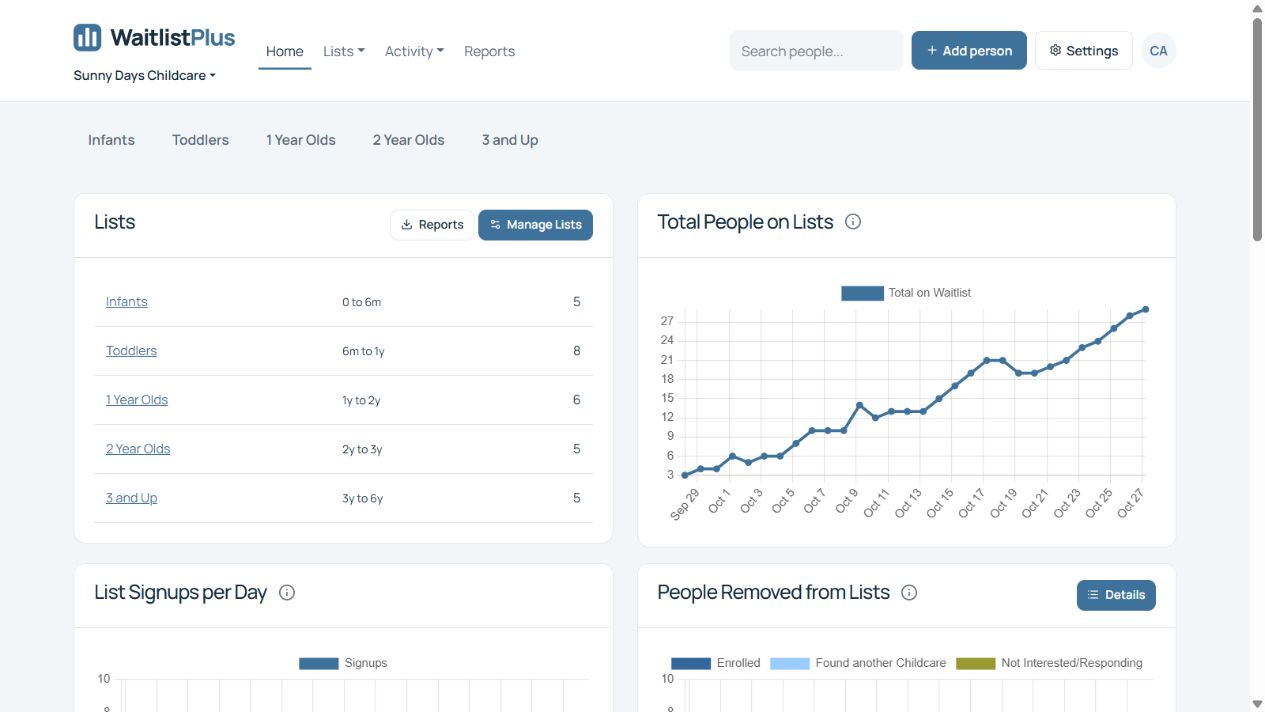
Find your way around the staff app
- Home: The dashboard shows your lists and recent activity.
- Lists: Open a waitlist to see who is waiting, their position, and their status.
- Activity: Review portal signups, list removals, payments, and email delivery history.
- Reports: Export lists or people and get email addresses.
- Search people and Add person: Find an existing record or add a new applicant or family.
- Settings: Configure the current site’s lists, statuses, priorities, fields, email templates, and customer pages.
- Site name: Switch between sites you can access. Use the account menu to manage your own login and profile.
Choose your next step
- Setting up a site? Follow Getting started – basic setup.
- Already managing a list? Learn to add, find, and edit people and families or manage a person’s place on a list.
- Ready to accept applications? Set up and share the customer signup form.
Overview video
New to WaitlistPlus? Start a free trial.